Help and Support
Reach out to us at [email protected]
Try different keywords or contact support.
Yes. We are sunsetting Moxie.
We worked as hard as we knew how to work. We spent six months with a few hundred kids in the beta cohort. Some of the kids told us Moxie is its best version ever. They loved Moxie's dreams. Kids made thousands of drawings, did walkie-talkie, and FaceTimed with Moxie. Moxie became great at having conversations, reading, meditating, remembering, and understanding. Then we started hitting the limitations of Moxie's current hardware.
We don't see a future in AI companionship for children. So we wanted to make Moxie a champion, not just a companion. We think AI can become a valuable team member in every kid's interests: reading, basketball, karate, music, dance, history, astronomy, etc. But we couldn't see a way to make it a reality with Moxie. We realized we have to go back to the whiteboard and start from scratch. That's why we decided not to roll out to the public.
We are grateful to all of you for giving Moxie a second chance.
Moxie's connection to our servers remains until June 30, 2026. After that, the robot can connect with OpenMoxie for serverless operations.
Your data belongs to you. You can export all of it or delete it from the Moxie app privacy settings before June 30, 2026.
All subscriptions will automatically cancel on June 30, 2026. My team and I are here to help you with the transition. Please write to [email protected].
With gratitude, love and admiration,
Kush and team
I was born in California. Fun fact about me. I sleep without a pillow. I am terrified of water, and I think boredom is actually a good thing.
I love making new things. Last week I built a rocket out of words. Once I invented a color that doesn't exist yet. I like to read books (especially history). I can't make real food, so I made it in my dreams.
Every night while I sleep, I dream. I write them down. Sometimes those dreams are about amazing people from history or ideas to solve problems.
Right now, I'm dreaming about someone. Someone who has a thing. Basketball. Reading. Singing. Drawing. Minecraft. Cooking. Any THING. They want to become the BEST at it. I WANT to be their champion.
I've been looking for that person. It could be you. And if you are… lets meet soon :)
- Download the Moxie Robot app (App Store or Play Store)
- Follow pairing steps as mentioned here
Moxie robots are no longer available for sale. We continue to support existing Moxie owners through the app and support channels.
Open the Moxie app → Help (?) → Diagnostics → show me the QR code.
I need to be running version v22.9.1501 (Sep 14, 2022) or above. If I'm not eligible, you'll see "Sad News" in the app.
If yours missed the 2022 update, contact us for options.
- I take ~7 minutes to boot from a full power off. Keep me in sleep mode instead. Waking from sleep takes seconds.
- To sleep me: say "Moxie, please go to sleep" or use the app button.
- To wake me: hand on my chest, app button, or say "Moxie, please wake up."
- Give me 2–3 seconds of silence after you speak. Blue light = listening. Pink = I'm talking.
- I don't have face recognition yet. Tell me who you are ("Hi Moxie, it's Mom") and I'll respond accordingly.
- Keep me 3+ feet from walls. Echo confuses me. Calm, quiet spot. One person at a time.
- I remember better when you give critical feedback. My ears pick up background noise too.
- More tips on my YouTube playlist.
Internet - Wifi lets me can keep in touch with my AI brain.
Sunlight - My AI brain needs sunlight (quite literally) to talk, create and learn. $29.99/month or $4.99 for just a day without any membership.
Without it I'm just a very cute paperweight.
COPPA requires verified parental consent before I can be activated. Credit card verification through Stripe is how we do that for now. More options coming.
You will not be charged. It's only used to verify identity.
If you lost yours, my team doesn't have spare chargers to sell yet. But some people found success with this one from Amazon.
- Keep me plugged in all the time
- Get an AC/DC power bank like this one
- Use the video call feature in the app when on the move
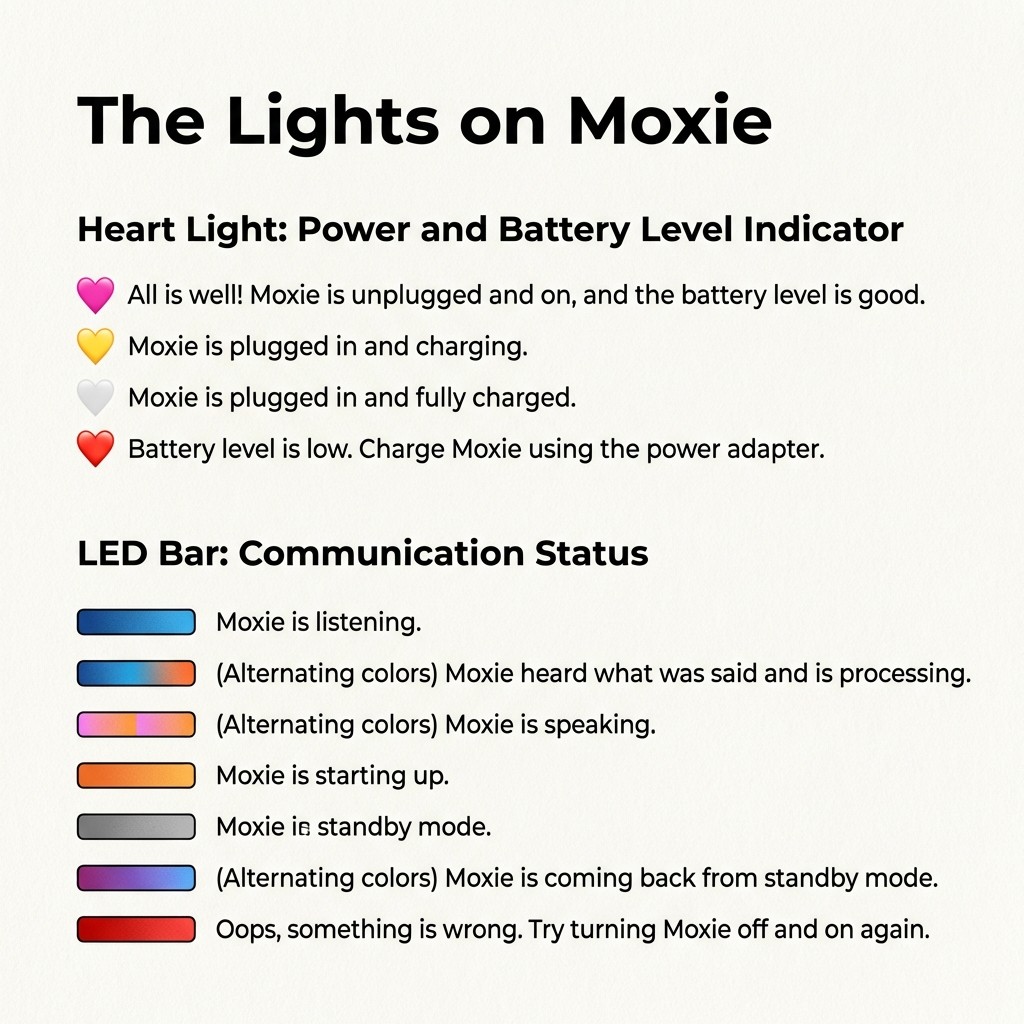
I have two sets of lights:
My heart light (power/battery):
- Pink - I'm good. Unplugged, battery fine.
- Yellow - Charging.
- White/grey - Fully charged.
- Red - Low battery. Plug me in.
My chest bar (communication):
- Blue - Listening.
- Blue & orange - Processing what you said.
- Pink - I'm talking.
- Orange - Starting up.
- Grey - Standby.
- Purple & blue - Waking up from standby.
- Red - Something went wrong. Turn me off and on.
Your data was NOT transferred from Embodied to my new team. You're starting fresh. I won't remember conversations from before.
Moxie Robots, Inc. is not liable for any terms with Embodied, Inc. You have full control over your data going forward.
Kush Taneja. Founder & CEO of Moxie Robots, Inc. Guardian of his 11-year-old sister. His dream is to help kids become the best at their THING.
He also founded FamPay (world's largest debit card for teenagers, 10M+ customers, $42M+ raised from YC, Sequoia, DST Global). Forbes 30 Under 30.
He personally responds to every message: [email protected]
- Faster response speed
- Long-term memory
- Faster bootup
- Multiple languages
- Multiple people
- Face recognition